Multi-Platform RTMP Streaming
Stream simultaneously or selectively to Corillo, Twitch, Kick, YouTube, or any custom RTMP endpoint. One interface, multiple destinations.
Advanced Streaming Engine
A Windows desktop application for multi-platform RTMP streaming. Powered by a built-in FFmpeg engine — broadcast live from local playlists, online sources, or direct feeds to Corillo, Twitch, Kick, YouTube, or any custom RTMP endpoint.
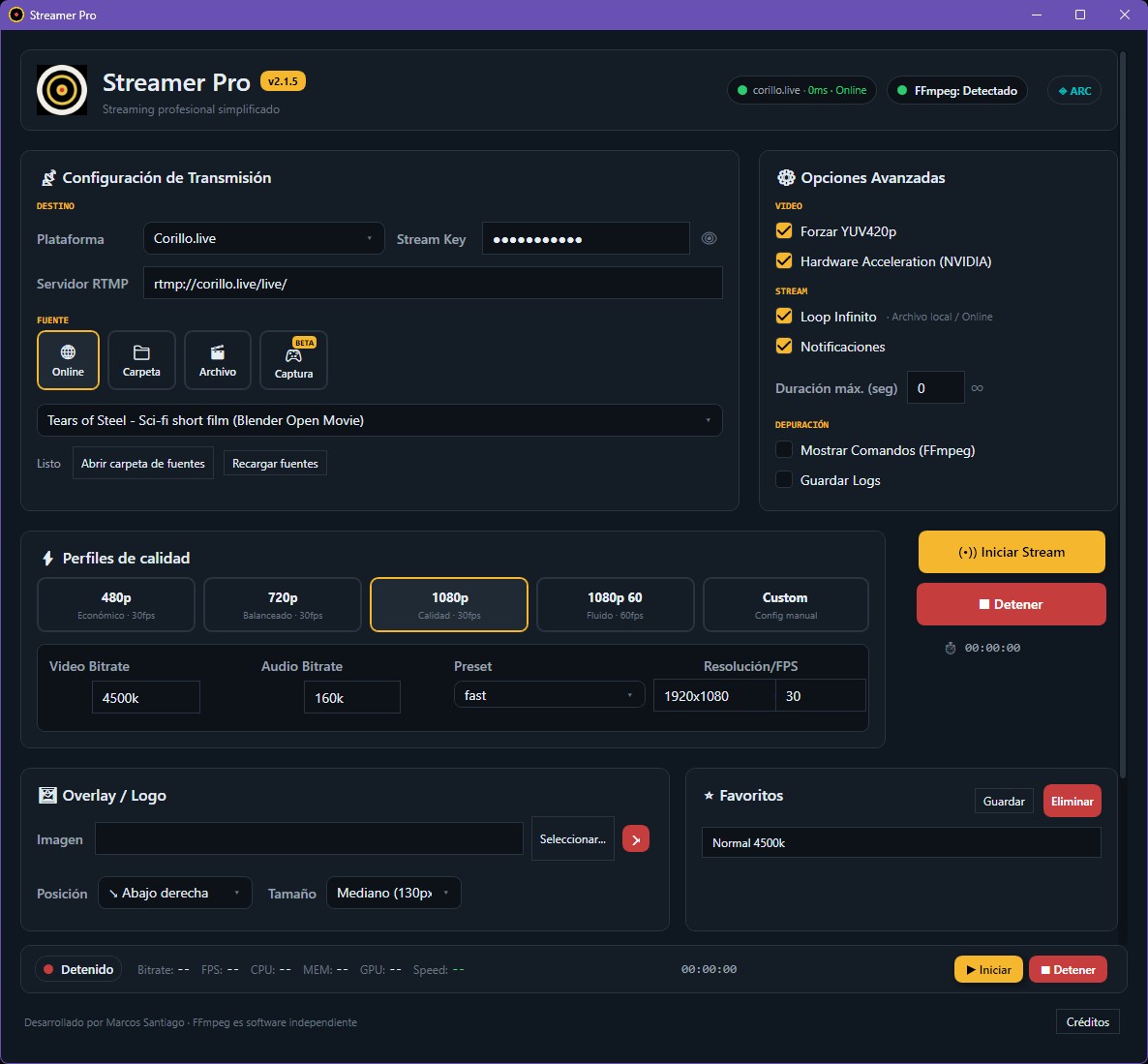
Streamer Pro bundles all the tools a broadcaster needs — no extra installs, no configuration headaches. Just open, configure, and go live.
Stream simultaneously or selectively to Corillo, Twitch, Kick, YouTube, or any custom RTMP endpoint. One interface, multiple destinations.
No FFmpeg on your system? No problem. The app detects it's missing and downloads it automatically (~35 MB) with a progress indicator. No PATH configuration needed.
Relay or rebroadcast any stream URL — YouTube, Twitch, or any HTTP/RTMP source. Pull it in and push it to your destination with full quality control.
Point to a local folder and stream all videos as a playlist. Supports Loop, Shuffle, Wait Mode (holds the stream until new files appear), and Highlight Mode.
Stream a single video file directly — no playlist setup needed. Load the file and go live instantly. Ideal for events, presentations, or one-off broadcasts.
Randomize your playlist order or loop continuously — perfect for automated 24/7 channels or looping highlight reels without any manual intervention.
Built for SteelSeries Moments, NVIDIA Highlights, and AMD ReLive. Watches clip folders in real time — each new clip hits your stream within minutes of the play, and the last clip loops so your channel never goes black.
Five ready-to-use profiles: 480p, 720p, 1080p, 1080p60 Fluido, and Custom. Full control over bitrate, FPS, and resolution in one click.
Auto-detects NVIDIA (NVENC), AMD (AMF), and Intel (QSV) GPUs. Enable hardware encoding to drastically reduce CPU load during high-bitrate or 1080p60 streams.
Live stats bar shows bitrate, FPS, CPU, GPU, memory, and encoding speed while streaming — spot issues before your viewers do.
Intelligent padding and scaling ensures your video is never stretched or distorted, regardless of the source resolution.
Save your go-to quality settings as favorites for instant recall. Minimize to system tray and keep streaming in the background — the stream never stops.
Add a custom logo or watermark to your stream. Choose the corner position and size — FFmpeg burns it in automatically on every frame, in every mode.
Stream directly from your desktop or any monitor — no OBS required. Uses Windows Desktop Duplication with GPU hardware encoding (NVIDIA, AMD, or Intel) for a lightweight, zero-overhead capture pipeline.
Streamer Pro checks for new versions on every launch. When an update is available, a badge appears in the header — one click downloads and installs it automatically, no manual downloads needed.
Switch the entire interface between English and Spanish with one click. The preference is saved automatically — every label, button, and message updates instantly across all windows.
Streamer Pro is a native Windows desktop application engineered for reliability and performance. Built on modern .NET technologies with an async-first architecture.
ffmpeg.exe / ffprobe.exe on startup and downloads them automatically (~35 MB) — no manual install or PATH setup needed.%AppData% for per-user portability.Streamer Pro is designed for anyone who needs reliable, automated, or multi-platform streaming without the complexity of a full production suite.
Streamer Pro includes built-in presets for the most popular RTMP platforms. Select your destination from the dropdown, enter your stream key, and go live — no URL lookup needed.
Windows 10/11 · No extra install required
This is a beta release. Some features may be incomplete or change between versions. Report issues to the developer.
Developed by Marcos Santiago
Built with the assistance of Claude Code by Anthropic
Part of the CORILLO Streaming Ecosystem
También te puede gustar